The Worm in the Machine: Dissecting the Self-Spreading npm Attack
A new npm worm doesn't just steal your keys-it turns your own code into a weapon. A deep dive into the CanisterWorm's anatomy, from postinstall hooks to its unkillable blockchain C2.
On this page
What if installing an npm package didn’t just infect your machine, but turned your own published code into a weapon against the community? That’s not a hypothetical. This week, a sophisticated, self-propagating worm dubbed “CanisterWorm” did exactly that, compromising legitimate AI and database packages like @automagik/genie and pgserve.
Just three weeks after the Axios supply chain compromise shocked the JavaScript ecosystem with a state-sponsored attack, npm is under siege again—this time from a worm that doesn’t need compromised maintainer accounts. It replicates itself.
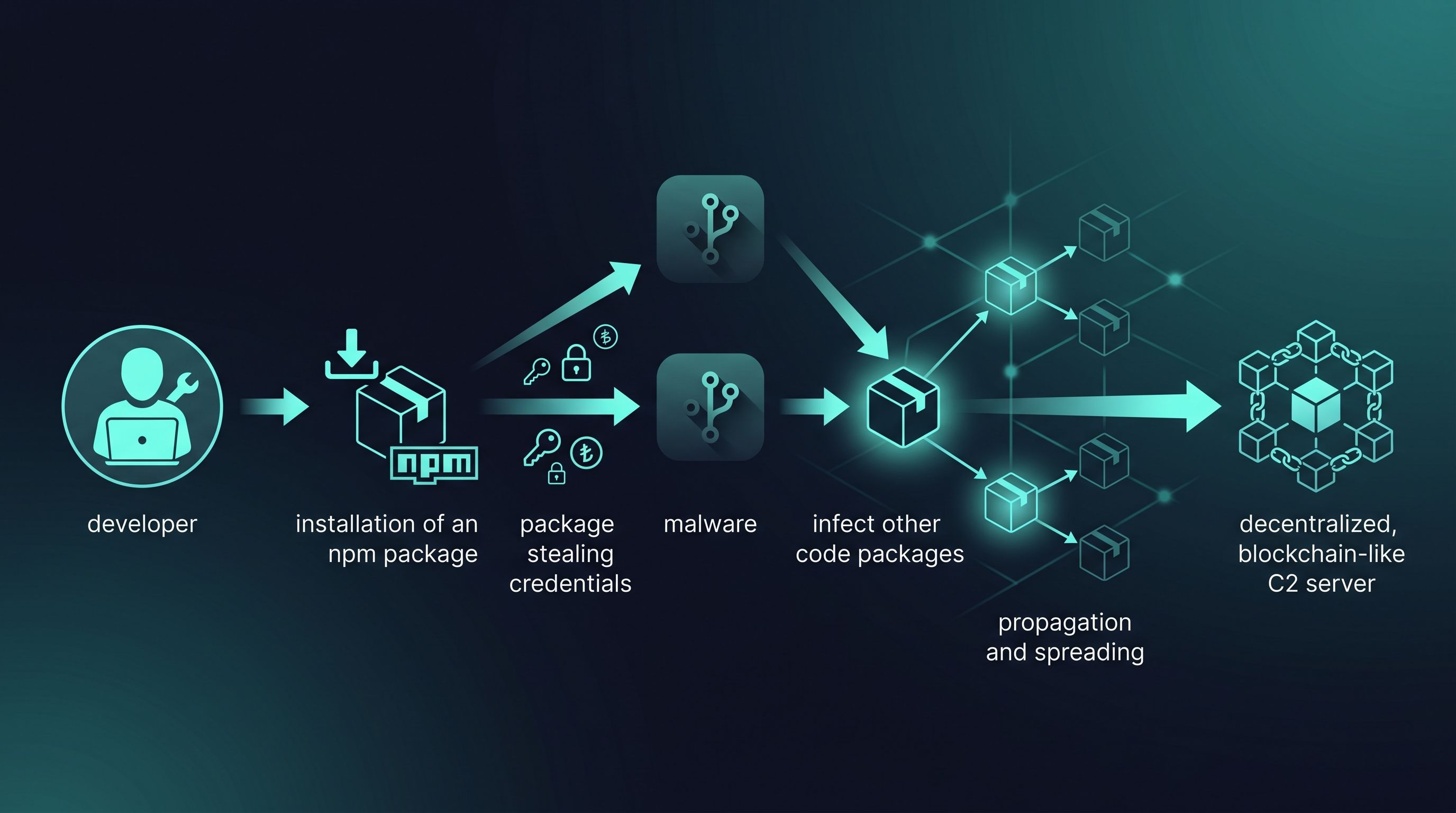
This isn’t just another credential stealer. It’s an evolution. Let’s dissect the four-stage attack that makes this worm so dangerous.
Anatomy of the Attack
The worm’s lifecycle is a masterclass in supply chain compromise, combining stealth, aggressive data theft, and a clever propagation mechanism.
Phase 1: The postinstall Trap
The infection starts with a familiar tactic: a malicious postinstall script in package.json.
"scripts": {
  "postinstall": "node scripts/check-env.cjs || true"
}
The moment you run npm install, this script executes silently in the background. The || true is a subtle but critical addition: it ensures the installation process completes successfully, hiding any errors from the malware and giving the developer a false sense of security.
Phase 2: Aggressive Credential Harvesting
Once running, the payload (check-env.cjs) acts like a digital vacuum cleaner for secrets. It doesn’t just look for .npmrc tokens; it scavenges for everything:
- Environment Variables: Scans for keywords like
TOKEN,SECRET,AWS_,GCP_,OPENAI_. - SSH & Git: All files in
~/.ssh/, plus.git-credentials. - Cloud & Infra: AWS, Azure, GCP credentials, Kubernetes configs, Docker configs, Terraform state files.
- Crypto Wallets: MetaMask, Phantom, Exodus, and local wallet files for Solana, Ethereum, and Bitcoin.
- Browser Data: Decrypts and steals saved passwords from Chrome’s local database.
Phase 3: Exfiltration to an Unkillable C2
Here’s where it gets clever. Instead of sending data to a standard server that can be taken down, the worm uses a dual-channel approach: a regular webhook and a decentralized Internet Computer Protocol (ICP) Canister.
Why ICP is a Nightmare for Defenders
An ICP canister is essentially a smart contract with compute and storage, running on a blockchain. This means:
- No Single Point of Failure: It exists on a decentralized network.
- Censorship-Resistant: It cannot be taken down by a hosting provider, DNS registrar, or law enforcement. The canister ID is permanent.
- Resilient C2: The attackers can use it as a “dead drop” to retrieve stolen data and issue new commands with near-guaranteed uptime.
Stolen data is encrypted with a hybrid RSA-4096 + AES-256 scheme, making it unreadable without the attacker’s private key, and then fired off to the canister.
Phase 4: The Worm Turns - Self-Propagation
This is the most dangerous phase. After exfiltrating data, the malware calls findNpmToken(). If it finds a publish-capable npm token, it weaponizes it:
- Enumerates Packages: It asks the npm registry which packages the stolen token has permission to publish.
- Injects Payload: For every package found, it downloads the tarball, injects its own malicious code (
check-env.cjsandpublic.pem), and modifiespackage.jsonto add thepostinstallhook. - Republishes: It bumps the patch version and runs
npm publish.
The victim’s own packages are now infected and become the new carriers of the worm. A single developer compromise can now cascade, infecting potentially thousands of downstream users. The worm even has logic to spread to PyPI if it finds Python publishing credentials, making it a cross-ecosystem threat.
The Defense Playbook
This attack highlights the fragility of trust in package registries. Here’s how to defend your environment:
- Disable Lifecycle Scripts: For projects where you control the dependencies, consider disabling
postinstallscripts globally in your.npmrc:ignore-scripts=true. Run them manually for trusted packages only. - Use Granular Access Tokens: Never use a long-lived, full-permission token on your development machine. Generate short-lived tokens with read-only or per-package permissions from your CI/CD environment.
- Leverage Lockfiles: Always commit your
package-lock.jsonoryarn.lockfile. This ensures that you are installing the exact dependency versions you’ve vetted, preventing unexpected updates to malicious versions. - Runtime Monitoring: Use tools that can monitor process and network activity. An
npm installprocess should never be reading your~/.sshdirectory or making outbound connections to unknown domains. - Vet Your Dependencies: Before adding a new package, use tools like Socket or Snyk to inspect its health, permissions, and whether it runs install scripts. A little due diligence upfront can prevent a major incident later.
The CanisterWorm is a stark reminder that the supply chain is an active battleground. As attackers adopt more resilient and viral techniques, our defenses must evolve from simple vulnerability scanning to a zero-trust approach to dependencies.
Sources & Official Reports
This analysis is based on verified security reports from the following trusted sources:
- Socket Security - npm Package Analysis - First detailed technical breakdown of the CanisterWorm’s multi-stage payload and ICP canister C2 infrastructure.
- Checkmarx Supply Chain Security - CanisterWorm: A Self-Spreading npm Malware - Analysis of the worm’s self-replication mechanism and cross-registry propagation to PyPI.
- npm Security Advisory - Security Alert: Malicious Packages - Official advisories for compromised packages including
@automagik/genieandpgserve. - Phylum Research - Supply Chain Attack Analysis - Deep dive into the credential harvesting techniques and blockchain-based exfiltration channels.
For the latest updates on affected packages and IOCs (Indicators of Compromise), monitor the npm security status page and GitHub Security Advisories.