Why I Chose Claude Code Over Every Other AI Coding Agent in 2026
A comprehensive comparison and engineering deep dive into the terminal-native AI landscape. Why Claude Code dominates for CLI-oriented developers.
On this page
1. The terminal renaissance
The AI coding landscape in 2026 is brutally saturated. We have over 15 serious agentic tools competing for our attention. However, a distinct architectural divide has emerged: the IDE-native wrappers (Cursor, Copilot, Windsurf) and the terminal-native orchestration engines (Claude Code, Gemini CLI, OpenCode, Codex CLI).
If your workflow revolves around tmux, Neovim, and shell pipelines, bolting an AI onto a heavy Electron-based editor feels like putting training wheels on a Ducati. You don’t want a ghost typing in your editor; you want a highly autonomous daemon executing shell commands, parsing stdout, and managing its own memory.
2. IDE vs CLI philosophy
To understand the difference, we must look at how these tools interact with your code.
IDE agents rely on LSP (Language Server Protocol) and AST (Abstract Syntax Tree) injections. They operate in a “shadow workspace.” When you ask Cursor to refactor, it does it in-memory and renders a visual diff. It’s safe, but strictly bounded by the editor’s execution sandbox. It suggests code.
CLI agents, like Claude Code, operate via a Subprocess REPL (Read-Eval-Print Loop). It physically spawns child processes on your host OS. It doesn’t just suggest text; it does work. It reads your git status, runs your test suite, greps your logs, and chains commands. It treats your operating system as its environment.
3. Head-to-head comparison
Instead of generic claims, let’s look at the hard technical specs across the top agents as of early 2026.
| Feature / Tool | Claude Code | Cursor | GitHub Copilot | Windsurf |
|---|---|---|---|---|
| Execution Environment | Terminal / Subprocess | IDE Shadow Workspace | IDE Inline / Chat | IDE Sandbox |
| Agent Autonomy | High (REPL loop) | Medium (Needs nudges) | Low (Copilot Edits) | Medium-High |
| Max Context Window | 200k (Sonnet 3.7/Opus 4.6) | Varies (~10k-20k active) | Workspace-limited | ~10k-20k active |
| Prompt Caching | Native (KV Cache via API) | Abstracted | Abstracted | Abstracted |
| Git Integration | First-class (--worktree) | Manual switching | Manual switching | Manual switching |
| MCP Integration | Native (stdio JSON-RPC) | Experimental | No | No |
| Cost Model | Pay-as-you-go (API) | Flat Monthly ($20+) | Flat Monthly ($10-$19) | Flat Monthly |
4. Why Claude Code wins for CLI developers
For terminal power users, Claude Code isn’t just another tool; it’s an orchestration engine.
Agent Autonomy (The ReAct Loop)
When you command Claude to “fix the staging build”, it emits an execute_command to run tests. The magic is the deterministic catch: It reads the OS-level exit code. If 1, it feeds stderr back into its context, reasons about the stack trace, emits edit_file, and loops. It only yields back to tty when the exit code hits 0.
Project Memory & Hooks System
CLAUDE.md acts as long-term architectural memory. Furthermore, hooks.yaml intercepts the execution loop. If the AI attempts a destructive command (rm -rf), your custom PreToolUse bash script can return exit code 2, physically blocking the subprocess and forcing the AI to re-evaluate.
Git Worktrees & Parallel Agents
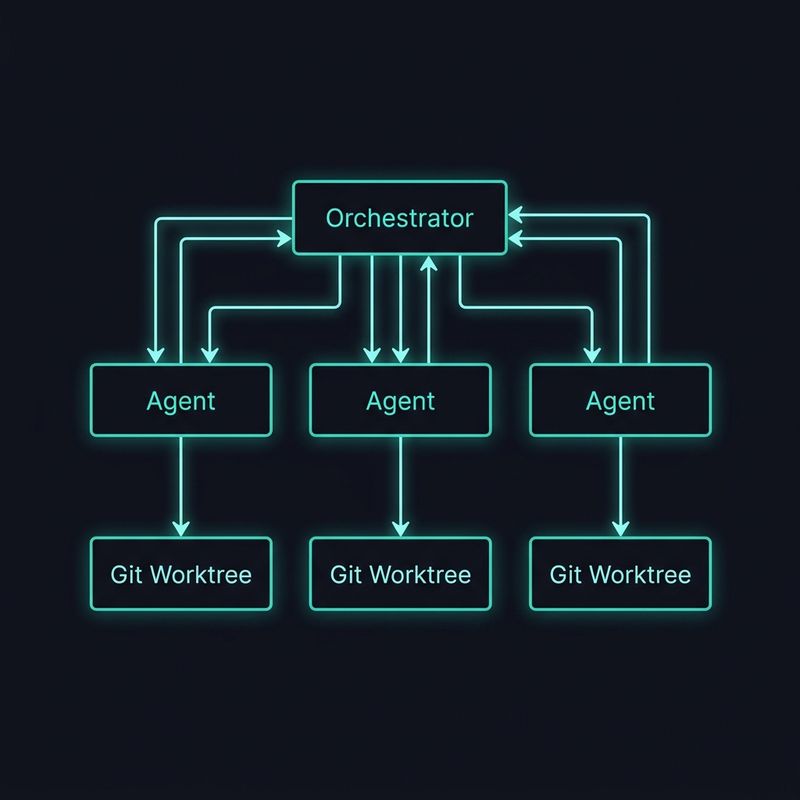 Claude Code leverages
 git worktree add, creating new physical directories that symlink to the shared .git/objects database. You can spawn three agents in three isolated worktrees simultaneously—taking milliseconds and zero extra disk space.
Headless Mode for CI/CD You can run Claude in CI pipelines without a TTY. It can automatically attempt to fix broken builds, commit the fix, and push—zero human intervention required.
MCP Extensibility
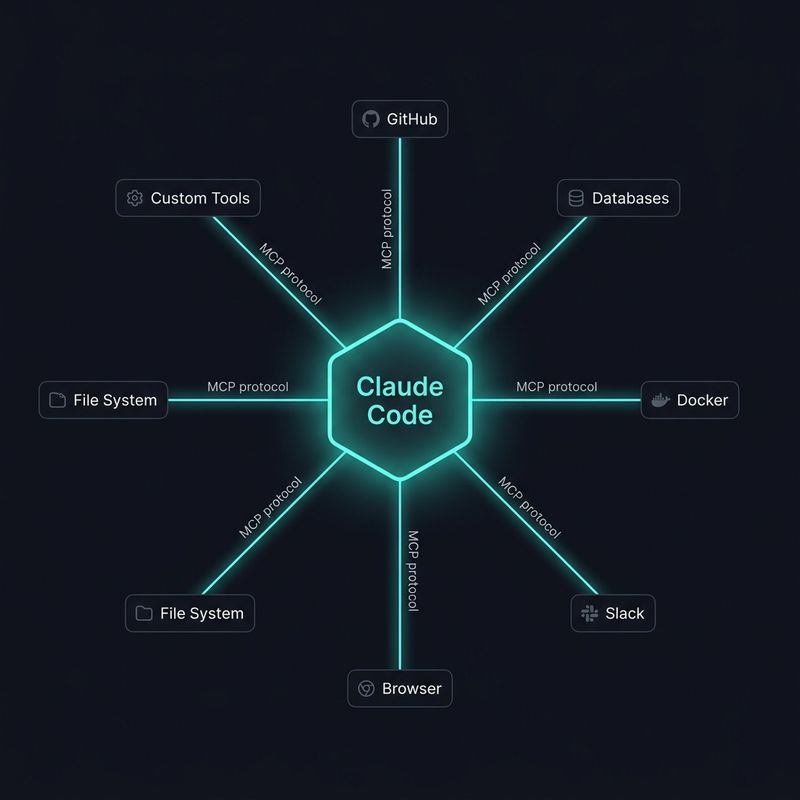 Claude Code acts as an MCP Client communicating via JSON-RPC 2.0 over
 stdio. Need database schema context? It fires a structured JSON request to your Postgres MCP server, eliminating the need to write and parse messy bash scripts.
5. 10 power tips most people don’t know
If you’re just typing claude and asking questions, you’re barely scratching the surface.
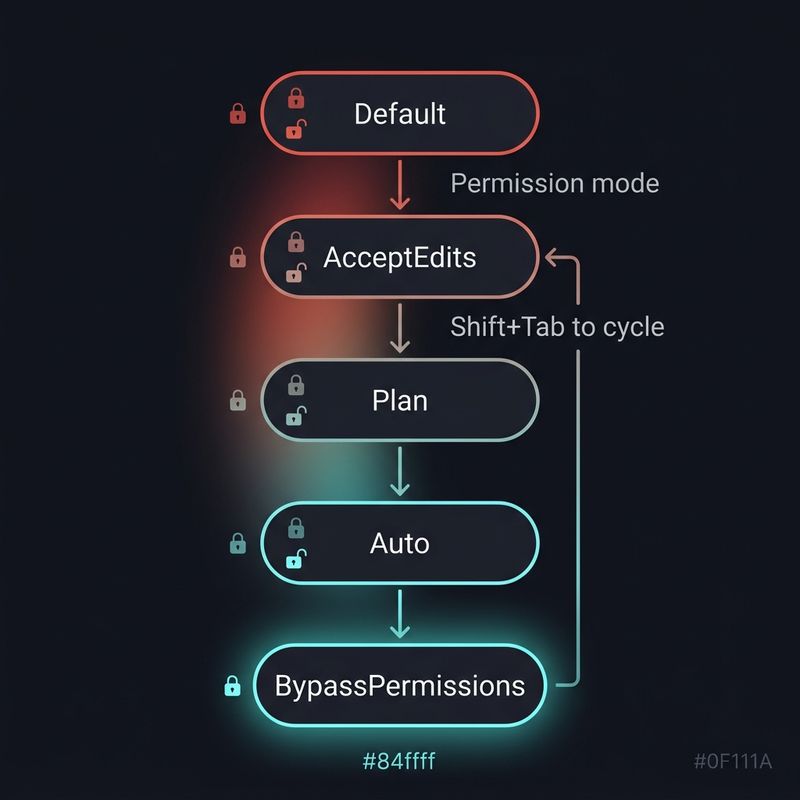
- The
ccAlias & Permission Modes: Mapcctoclaude. UseShift+Tabto cycle permission modes. Useautofor trusted local repos to avoid constant confirmation prompts. - The
.claudeignoreLifesaver: Blockpackage-lock.jsonand compiled binaries. This saves 50-70% on token costs per request. - Session Forking (
--fork-session): Pre-warm a session with massive context, then fork it to test two different implementation strategies in parallel. - Subagents for Parallel Work: Use custom agents (
claude --agent reviewer) for specific tasks with scoped permissions and custom instructions. /compactvs/clear:/compactforces Claude to summarize the last 50 turns, retaining architectural knowledge while flushing rawstdoutlogs./cleardestroys the cache completely.- Feedback Loops Methodology: Command explicitly: “Run tests. If fail, fix. Do not ask for permission until tests pass or 5 attempts.”
- Voice Input Workflow: Pipe voice tools (like MacWhisper) into the CLI. “Hey Claude, refactor this controller” is a game changer.
- Remote Control: Run Claude Code in a
tmuxsession on your dev server and steer it from your phone via SSH while commuting. - Pre-Warming Context: Use
SessionStarthooks to automatically dump your DB schema or API routes into the session on startup. - Custom Skills: Write reusable
.claude/skills/SKILL.mdfiles for repetitive boilerplate or deployment checklists.
6. Real cost analysis
Agentic coding isn’t free. While Copilot gives you a flat rate, Claude Code is pay-as-you-go via the Anthropic API.
Running an autonomous loop on Opus 4.6 with a 200k context window should theoretically bankrupt you. However, the secret weapon is Prompt Caching (KV Cache). Because Claude puts static context (files, system prompt) at the top of the payload, the REPL loop hits the cache on every recursion. Cached tokens cost 90% less.
A heavy dev week might cost $15-$40. But if an agent writes a microservice in 10 minutes that would take you 4 hours, that API cost is the highest ROI you’ll generate all year.
7. When NOT to use Claude Code
Claude Code isn’t a silver bullet.
If you are tweaking CSS grids, building complex React UI components, or need instant visual feedback via a browser preview, stick to an IDE-native tool like Cursor.
Similarly, if you are learning to code from scratch, the CLI abstraction and raw shell execution might be too steep and dangerous.
But if you are debugging race conditions, orchestrating CI/CD pipelines, migrating database schemas, or doing heavy backend refactoring? Claude Code is a paradigm shift. It elevates you from a syntax typist to an engineering orchestrator.